
Your Request is under process, Please wait.

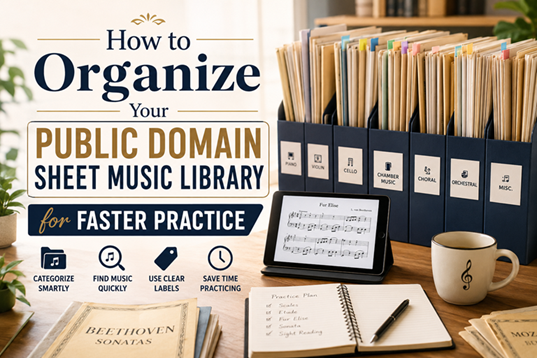
If you've been scoring for any length of time, you know how this goes. You download a piece for a lesson, save another one for later, and before you know it, you have a folder, or worse, a stack of loose printouts without any real order. A Public Domain sheet music Library is only useful if you can locate what you want in thirty seconds or less. Otherwise, you’re wasting practice time looking for a file, instead of playing it.
If you've been scoring for any length of time, you know how this goes. You download a piece for a lesson, save another one for later, and before you know it, you have a folder, or worse, a stack of loose printouts without any real order. A Public Domain sheet music Library is only useful if you can locate what you want in thirty seconds or less. Otherwise, you’re wasting practice time looking for a file, instead of playing it.
Here's how to get your collection into shape without turning it into a weekend project you never finish.
People generally arrange things by composer, alphabetically, and they’re done. That’s fine for a few pieces, but it doesn’t scale when you have fifty or a hundred works. A smarter way is to nested folder your music by how you use it, following this order:
1. Instrument
2. Skill level
3. Composer
So if you are a beginner, struggling through Classical piano sheet music easy enough to play every day, you will need a folder just for that, separate from the folder with advanced repertoire and any sight reading music you play for fun. And when you go to practice, you’re not scrolling past pieces you’re not playing that week.
Folders are great for broad sorting, but they aren't particularly useful for the in-between stuff: articles you're actively reading, ones you've annotated, and ones you just want to keep around. A basic tagging system, or even a file prefix like “ACTIVE_” or “REVIEW_,” will spare you the trouble of opening a bunch of PDFs before you find the one you were supposed to be practicing today.
This matters even more for ensemble pieces. Bach Double Violin repertoire, for instance, usually needs both parts pulled up together, plus a full score for reference. If those files are scattered across folders, you're wasting minutes before you've even tuned up.
If you've read anything about choosing between editions, you already know quality varies a lot across free downloads. Don't just save one copy of a piece and forget where it came from. Keep a small "editions" subfolder for pieces where you've compared a few versions, especially anything with a lot of variation online, like different Public Domain Sheet Music Library entries for the same well-known concerto or sonata.
Label files with the source or edition name, not just the piece title. "Bach_DoubleConcerto_Urtext.pdf" tells you a lot more six months from now than "Bach1.pdf" ever will.
One trick that actually saves time: build a rotating folder for what you're working on this week or month. Pull copies, not the originals, of your current pieces into it, whether that's something from your Bach Double Violin repertoire or your easier classical piano list. When the rotation changes, swap the files out and keep your main library untouched.
A lot of people get stuck trying to build the "perfect" naming system before organizing a single file. You really only need three things in a file name:
● Composer
● Piece title
● Edition or arranger
It’s more important to be consistent than clever. If half of your files are in one format and the other half are in another, then you’re back at the start every time you search.
Libraries get messy again with age, even the good ones. Libraries turn messy again with time, even are ones. Spend twenty minutes every month to remove the finished pieces from your active rotation, delete any duplicates you really don't need, and make sure your Classical piano sheet music easy still easy for you where you're at now. Skill level changes, and your folders should keep up.
None of the above needs to be complex. When you go to play, your music is waiting for you, pre-sorted in a way that corresponds with how you practice, rather than how it happened to land on your hard drive. A well-organized collection turns practice time into practice time, instead of digital filing cabinet time. If you're still plugging gaps in your collection, Sheet Music International is a good place to start, simply because it's more feasible to maintain a library when you're not also running after sketchy scans from random corners of the internet.
Layer your folders by instrument, skill level, and composer, then use simple tags or file prefixes for what you're actively working on.
Keep them in a separate "editions" subfolder and label each file with the source or edition name, not just the piece title.
You need both parts and a full score grouped, so scattering them across folders wastes time before you've even started practicing.
Yes. Beginners benefit from a dedicated folder for easier pieces so they're not sorting through advanced repertoire they're not ready for yet.
Every few months is usually enough to remove duplicates, retire finished pieces, and keep your active folders matching your current skill level.

.png)

Sep 13, 2026
Follow us : 


Sheet Music International - Copyright 2026 all rights reserved
| English: Sheet Music (PDF) | Free Scores | French: Sheet Music (PDF) | Free Scores | Greek: Sheet Music (PDF) | Free Scores |
| German: Sheet Music (PDF) | Free Scores | Spanish: Sheet Music (PDF) | Free Scores | Portuguese: Sheet Music (PDF) | Free Scores |
| Italian: Sheet Music (PDF) | Free Scores | Russian: Sheet Music (PDF) | Free Scores | Norwegian: Sheet Music (PDF) | Free Scores |
| Ukrainian: Sheet Music (PDF) | Free Scores | Polish: Sheet Music (PDF) | Free Scores | Dutch: Sheet Music (PDF) | Free Scores |

